
10.2 レポートオプションを設定する
以下の設定には、Options ダイアログボックスの Reports タブを使います:
- レポートに表示する小数点以下の桁数の設定。
- 科学的記数法 (scientific notation) の使用と不使用。
- レポート結果への説明テキスト (explanatory text) の表示と非表示。
- レポートする値を絞り込むか否かの指定。
- レポートルーラーの表示と非示。
- 寸法単位の設定。
レポートオプションを設定するには:
- Main ボタン
 をクリックし、Options をクリックします。
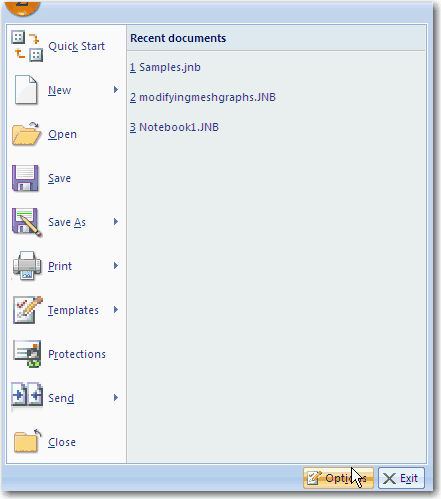
- Report タブをクリックします。
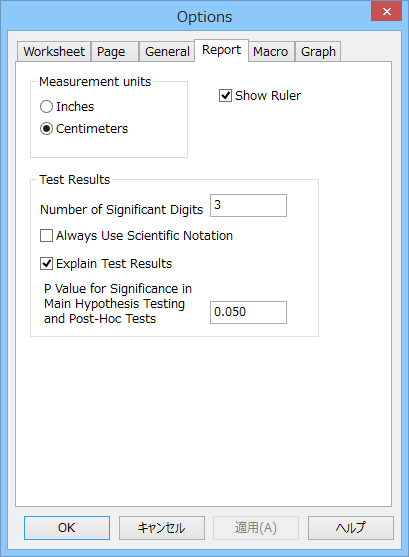
- レポートページの上余白にルーラーを表示するには、Show Ruler を選択します。このオプションはデフォルトではオンになっています。ルーラーを非表示にするには、このオプションのチェックを外します。
- レポートの値で使用する有効桁数を設定するには、Number of Significant Digits を選択します。デフォルトの桁数は 3 です。桁数の上限は 16 です。
- レポートに注釈を追加する場合は、Explain Test Results を選択します。このオプションはデフォルトではオンになっています。レポートに注釈を使用しない場合は、このオプションをオフにしてください。
- 有意な P 値を指定するには、P Value for Significance を選択します。このオプションは検定している群の平均値の差に統計的有意差があるかどうかを測定します。指定した値はすべての検定で計算された P 値と比較されます。
※ Note: この P 値は実際の検定結果に影響を与えません。これは群の平均値の差が偶然または、無作為抽出のばらつきによるかを示すテキストにのみ影響を与えます。 ここで設定した P 値よりも検定で計算された P 値が小さい場合、テキストで “The difference in the mean values of the two groups is greater than would be expected by chance; there is a statistically significant difference between the input groups ” (2群の平均値の差は、偶然で見込まれる差よりも大きいので、入力された群間には統計的有意差がある。) と記載されます。
ここで設定した P 値よりも検定で計算された P 値が大きい場合、テキストで “The difference in the mean values of the two groups is not great enough to reject the possibility that the difference is due to random sampling variability. There is not a statistically significant difference between the input groups ” (2群の平均値の差は、無作為抽出のばらつきによる差である可能性を否定するには十分でないので、入力された群間には統計的有意差はない。) と記載されます。
検定で計算される P 値ごとに、上記説明のテキスト文字列のいずれかが表示されます。分散分析 (ANOVA) および、いくつかの回帰は複数の P 値を生成します。
※ Note: Explain Test Results オプションが無効になっている場合、P 値の結果はレポートに表示されません。 - レポートページの上部の空白にルーラーを表示するには、Show Ruler を選択します。このオプションはデフォルトで有効に設定されています。このチェックを解除するとレポートルーラーは非表示になります。
 |
 |
 |