日本語
English

株式会社ヒューリンクス
TEL:03-5642-8384
営業時間:9:00-17:30
Q-Chem 6.4 インストールガイド (Linux/Mac 版)
1. スクリプトファイル「qcinstall.sh」の入手
次の2つの方法があります。
(A) スクリプトファイル「qcinstall.sh」のみダウンロード
※ パッケージを構成するファイルは 手順2 を実行することでインストールされます(実行の際、マシンがインターネットに接続されている必要があります)
- Linux 版では次のように実行してください
# wget -N https://downloads.q-chem.com/qcinstall.sh # chmod +x qcinstall.sh - Mac 版では次のように実行してください
# curl https://downloads.q-chem.com/qcinstall.sh > qcinstall.sh
# chmod +x qcinstall.sh
(B) スクリプトファイルを含むパッケージを構成するすべてのファイルを TAR ファイルとしてダウンロード
※ マシンがインターネットに接続されていない環境で 手順2 を実行する場合はこちらの操作をお願いします。
- Order number をお知らせしたメールに記載のダウンロードページ下部の「6.4」もしくは「current」を選択します。

「Please select the Q-Chem executable binary codes you wish to download」から適切なバイナリにチェックをつけ、ライセンス承諾書をご確認の上ご同意ください(「I agree to the terms and … 」のチェックボックスにチェックマークを入れてください)。
「Download」を選択すると、「qc64.tar」がダウンロードされます。
(Mac の場合、「macOS Intel 64-bit shared memory parallel code」を選択してください)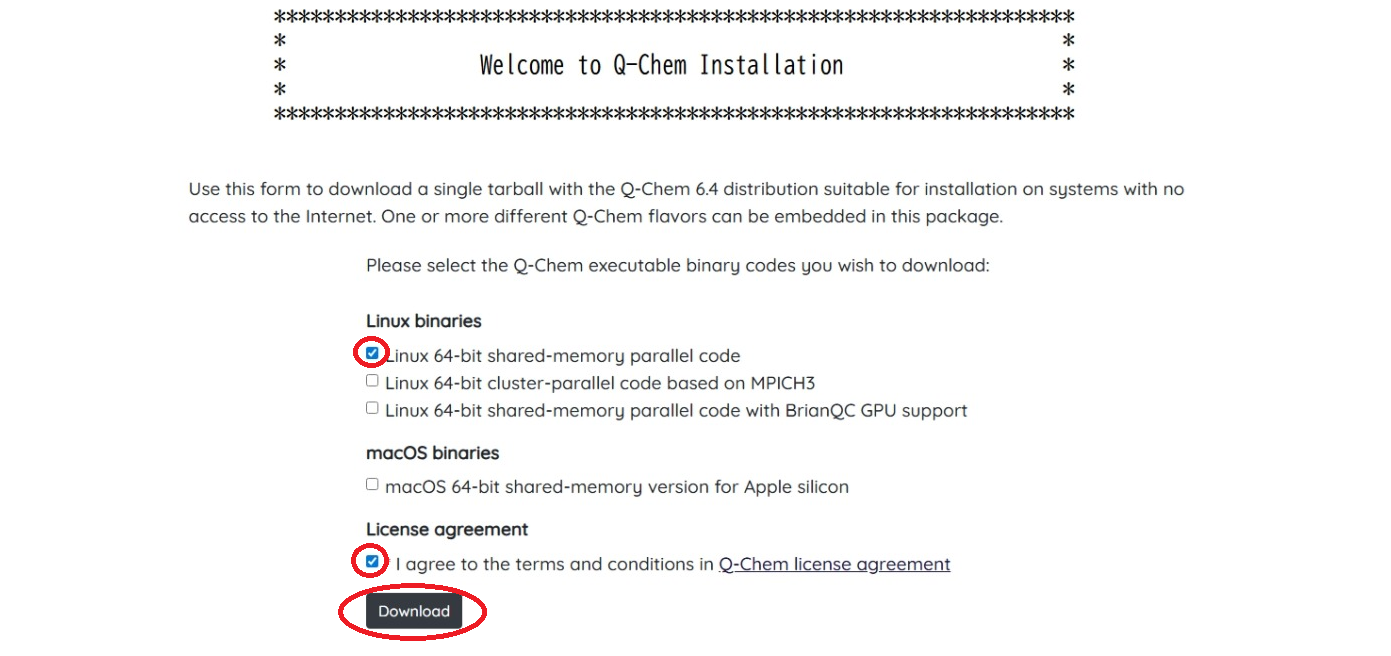
- 次のコマンドを実行し TAR ファイルを展開してください。
# tar xvf qc64.tar
2. スクリプトファイル「qcinstall.sh」の実行
このスクリプトの実行によりプログラムのインストール、環境設定、ライセンス申請を自動的に行います。
- 「qcinstall.sh」ファイルを実行します。
#./qcinstall.sh
******************************************************************
* * * Welcome to Q-Chem Installation * * * ****************************************************************** - インストール先ディレクトリのパスを指定します。ここでは「/usr/local/qchem」と設定します。ここで設定するディレクトリが空であるか、もしくは存在しないものが推奨されます。
※ この設定は「$QC/config/shellvar.txt」ファイルに記述され、あとから変更も可能です。Please specify the path of the new Q-Chem directory, type 'x' to exit program, <Enter> to use (/usr/local/qchem) > /usr/local/qchem - 次にインストールするプログラムを選択します。ここではシリアル版をインストールするため「1」を入力し、Enter を押します。
Q-Chem will be installed in /usr/local/qchem

You are installing Q-Chem 6.4.0
Available packages for LINUX_Ix86_64:
1 -- Linux 64-bit shared-memory version
2 -- Linux 64-bit version with NVIDIA GPU support (installs BrianQC 1.2)
3 -- Linux 64-bit version with NVIDIA GPU support (installs BrianQC 1.3)
Please choose package to install or press 'x' to exit [1-3]
> 1 - 次に環境設定を行います。まず、一時ファイルの保存先ディレクトリを設定します。ここでは「/usr/local/scratch」に設定します。
※ この設定は「$QC/config/shellvar.txt」ファイルに記述され、あとから変更も可能です。******************************************************************
* * * Q-Chem Runtime Environment * * * ******************************************************************
$OCSCRATCH:
A scratch directory, specified by the $OCSCRATCH variable,is
required for storing temporary files and for restarting jobs.
In a cluster environment the scratch directory must be a
shared directory available to all of the nodes.
Please specify the full path for a scratch directory
> /usr/local/scratch - デフォルトの使用メモリ上限を指定します。
※ インプットファイルにてメモリ上限を指定した場合はそちらが使用されます。
※ 「$QC/config」にある「preference」ファイルを変更することで、あとから設定の変更が可能です。
※ なにも入力せずに Enter を押すと 8000MB に設定されます。Default Upper Memory Limit: The MEM_TOTAL keyword in Q-Chem input files specifies the maximum amount of memory used by each Q-Chem process. Here you can set a default value for MEM_TOTAL, which will be saved in $QC/config/preference file. You can edit this file later or specify MEM_TOTAL in input files. Please specify a default value for MEM-TOTAL in megabytes [8000] > 8000 - 次に、「y」を選択し、ライセンス契約をご確認ください。
※ なにも入力せずに Enter を押した場合、「y」が選択されます。******************************************************************
* * * Q-Chem License Agreement * * * ******************************************************************
Please review Q-Chem's licensing agreement before registration.
Would you like to view the licensing agreement? <y/n>...<y>y - ライセンス契約をご確認頂いた後に、ライセンス申請情報の入力を行います。まず、お客様のオーダー番号をご入力ください。
******************************************************************
* * * Q-Chem License Registration * * * ******************************************************************

Registration is required to use Q-Chem. Please provide a valid
e-mail address in order to receive Q-Chem license file.

- If you are a current Q-Chem user, please provide the order number
below. It can be found in the e-mail you received from Q-Chem.

- If you are a new Q-Chem user without an order nubmer, please enter 0
below and provide the registration information subsequently.

Please enter your order number: ####
次に、メールアドレスをご入力ください。[IMPORTANT: a valid Email is REQUIRED to receive license]
Please enter your email address CORRECTLY: xxxx@yyyy.co.jp
最後に、入力した情報が表示されます。間違いがなければ「y」を入力してください。User Registration Information:
-----------------------------
Order Number: ####
Email: xxxx@yyyy.co.jp
Is the above information correct?<y/n>...<y>y - ライセンスオプションを選択します。ノードロックライセンスの場合には「1」を、FlexNetライセンス(ライセンス管理サーバーを利用する場合)の場合には「2」を入力してください。
インストールサマリーが表示されスクリプトが終了します。******************************************************************
* * * Q-Chem Licensing Options * * * ******************************************************************
Q-Chem has two options for licensing:
1-- Node-locked licensing where licenses are issued
for specific machines. This is appropriate for
single computers and most small clusters.
2-- FlexNet based remote licensing. This option
requires a central licensing server and is
appropriate for larger clusters and multi-
user environments.
Please specify the licensing scheme from above. (<1>/2)
> 1
3. ライセンスファイルの取得
お客様の環境等により (A) (B) の2通りが考えられます。
※ いずれの方法であっても手順4以降に差異はありません
(A) オンライン環境において正常に手順2のスクリプトが完了した場合
自動的に開発元へライセンスの申請が行われます。手順2において入力したメールアドレス宛に開発元からライセンスファイルが送付されるので、メールが届くまでお待ちください。
(B) 上記以外の場合
(オフライン環境、数日経過してもライセンスファイルが届かない、等)
手動にてライセンス申請を行ってください。インストール先ディレクトリ $QC 直下に生成された「license.data」ファイルを弊社もしくは Q-Chem 社宛にメールにてご送付ください。
- 「license.data」保存場所:$QC (ここでは「/usr/local/qchem」)
- 送付先アドレス(どちらか一方)
- soft.support@hulinks.co.jp(ヒューリンクスサポート宛)
- license@q-chem.com(Q-Chem 社宛)
4. ライセンス・インストール
開発元(office@q-chem.com)より下図のような「Q-Chem 6.4 License -…」という件名のメールが届きます。メールに添付されているファイルを、「$QCAUX/license」ディレクトリに「qchem.license.dat」として保存してください。
- 保存先:$QCAUX/license
- ファイル名:qchem.license.dat
5. 環境設定
Q-Chem を使用するには、ユーザ毎に環境変数の設定が必要です。シェルのリソースファイルに記述しておけば、毎回の設定が不要になります。
設定例
< bash, sh 系ユーザの場合 >
- リソースファイル: ~/.profile または ~/.bashrc
- 追加する行:
QC=/usr/local/qchem; export QC
 if [ -e "$QC"/qcenv.sh ] ; then
 . "$QC"/qcenv.sh fi
< tcsh, csh 系ユーザの場合 >
- リソースファイル: ~/.tcshrc または ~/.cshrc
- 追加する行:
setenv QC /usr/local/qchem
if (-e "$QC"/qcenv.sh) source $QC/qcenv.sh
6. 簡単な動作確認
- 環境変数の設定反映のため、再ログイン、または source コマンドを実行します。
<実行例> $source ~/.profile $ which qchem /usr/local/qchem/bin/qchem - $QC/samples/ ディレクトリにあるサンプル入力ファイルをコピーして、qchem プログラムを実行します。
<実行例>
ここでは $QC/samples/freq/FREQ_water.in を使用します$ cp $QC/samples/freq/FREQ_water.in .
$ qchem FREQwater.in FREQ_water.out &
You are running Q-Chem version: 6.4.0 - 計算結果を確認します。計算が正常終了すると、出力ファイルの最後に “Thank you very much for using Q-Chem. Have a nice day.” と表示されます。
<実行例>$ tail FREQ_water.out
-----------------------------------------------------------------
Total job time: 0.00s(wall), 0.22s(cpu)
Thu Jun 19 11:27:48 2014
**********************************************************
* * * Thank you very much for using Q-Chem. Have a nice day. * * * **********************************************************
<補足>
参照用インプットファイルが $QC/samples/ 以下にありますので、ご利用ください。対応するアウトプットファイルも参照用インプットファイルと同じにあります。